




What to Put in Your Website Footer (& What to Skip)
What if the key to keeping people on your website — and getting them to convert — is buried at the bottom?
Website footers aren’t the sexiest part of a site, but they’re crucial to conversion.
And legality. And a good user experience.
So, what should you put in your website footer… and what can you leave out?
Here are our best practices to help your website find its footing footer.
What Is a Website Footer, and Why Does It Matter?
A website footer is the section at the very bottom of a site, below the main body content.
It serves as a reference point for website users, giving them easy access to links and other info they may need.
The footer is typically the same on every page. Update it once, and it’ll get updated everywhere (unless you manually remove or edit it using custom code).
Here’s ours, so you don’t have to scroll:
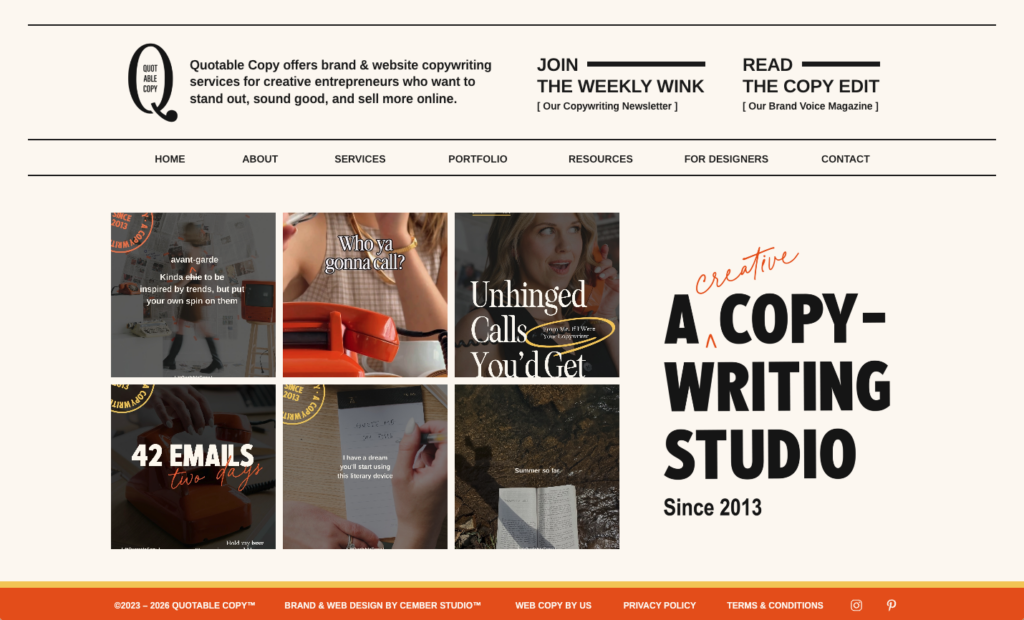
Our footer is pretty big and bold. (On purpose.)
Some footers are smaller and more minimal, like that of our design partner Cember Studio:

Why You Should Optimize Your Website Footer
Pretend you’re scrolling through a website but don’t see what you’re looking for.
You keep scrolling and either…
- Find what you need at the very bottom, and continue to engage with the brand
- Don’t find what you need, and give up on the site altogether
Website footers are like a safety net for users, capturing them before they fall off the page.
Here are a few other reasons your website footer matters:
- It creates goodwill. Many website users expect to find certain information in the footer. Including it builds trust and makes you seem approachable.
- It captures leads. A link, button, or embedded form in your footer can guide people to the next step and even convert them into an active subscriber.
- It boosts your SEO. Adding keyword-rich text and important internal links in your footer helps search engines crawl your site, so you rank higher in search results.
- It expands your brand. By including your logo, messaging, and social media, your footer reinforces your brand — both on and off your site.
What to Include in Your Website Footer (and What Not To)
For most pages, a website footer is nonnegotiable. But what should it look like?
Must-Have Elements
Every website footer should include…
- Branding: Your fonts, colors, and logo or business name (linked to your home page)
- Copyright notice: The copyright symbol and the year(s) you claim copyright ownership over your site
- Privacy policy: A discreet link to your privacy page (legally required if you collect user data)
- Terms of use: Similar to (but separate from) the above
- Contact information: Your physical address, phone, email, and/or link to your contact page
- Navigation links: Popular or secondary pages, possibly organized under headers (e.g., “Services”)
Nice-to-Have Elements
Your website footer may also include (some, but likely not all, of) the following:
- Elevator pitch: A short blurb about who you are, who you serve, and why it matters (using your target keyword)
- Social media: Links, icons, and/or embedded feeds for your Instagram, Pinterest, YouTube, etc.
- Email signup: A link or embedded form for your newsletter or lead magnet
- Website search: A (working) search bar for all public pages on the site
- Login: A link where clients, employees, or affiliates can easily access their portal
- Social proof: Testimonial(s), awards, certifications, and/or press (only if truly helpful)
- CTA button: A prominent link to the main action you want visitors to take
NOT-to-Have Elements
Your website footer should never include:
- Lots of text: Save conversion copy for the page content itself.
- Huge graphics: Avoid big images that slow down your site speed (and compete for attention with the rest of the page).
- Broken links: Check them regularly, so you don’t end up creating a worse UX.
- Expired content: See above.
- Keyword stuffing: Include keywords where relevant, but don’t try to trick Google (or annoy your readers).
- Illegible content: Avoid tiny fonts or low-contrast text.
When to Remove Your Website Footer Entirely
There are only a few cases in which we recommend removing the website footer from a page:
- On a sales page where your only goal is to convert clients or customers (so you need to remove all possible distractions)
- On a news or media site that loads infinite content (although we personally despise these)
Start Off on the Right Footer!
Ready to put your (website) foot(er) down?
How many more puns can we make in this post?
If you need some advice on your footer — or anything else about your site — that’s what our website audit service is for.
We’ll review your entire site to make sure it’s set up for success, including elements like:
- Brand messaging
- Brand voice
- Design
- User experience
- And much more (including the footer!)
Learn more and book your audit here.
After all, we don’t want you to shoot yourself in the footer.